


FlipShare TV Wireless A/V Extender – $19.99
Tuesday, September 13, 2011
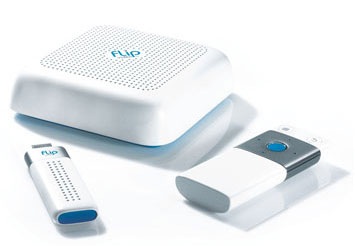

Alone and Streaming
Dad, come quick! I think my digital camcorder is sick or something!
“Just calm down, Jimmy. Now what seems to be the problem? What’s your camcorder doing that’s got you so riled up?”
Just look at him, Dad! He’s still capturing video and storing it on my computer’s hard drive, but now he just sort of sits there in his cage. He looks so… so sad!
“Aw, buddy. Your camcorder’s not sad. He’s just a little lonely, that’s all. What he needs is a special friend to help him share all those videos you two have shot. I bet that’d perk him right up.”
You don’t mean bring him a girl camcorder, do you? BLECH.
“Ha! No, son, I mean that maybe we should get him a FlipShare TV Wireless A/V Extender to play with. All we’ll have to do is bring one home, connect the FlipShare TV Base to our HDTV, plug the USB Key into your computer, and I bet just knowing we can enjoy all our videos from your FlipShare™ library on a big screen with just the press of a button on the included remote control will make him feel like his old self again.”
Even if I didn’t shoot the video with a Flip camcorder?
“That’s right, buddy!”
Gosh, Dad. I wish making friends was as easy for me as it is for my little camcorder.
“Well, son. Give it time. As soon as you stop thinking of your gadgets as pets, start taking your meds regularly, and the therapist says you’re not a danger to society, I’m sure you’ll be making friends just like other thirty-somethings like yourself. Now go see your mother. She should have your sponge bath almost ready.”
Warranty: 1 Year Flip
Condition: New
Features:
- Flip video cameras are known for making video simple, and now, with FlipShare TV, it’s even easier to enjoy and share your videos
- FlipShare TV lets you watch your entire Flip Video library wirelessly on your TV or HDTV
- Just connect the FlipShare TV Base to your TV, plug the USB Key into your computer, and start enjoying your Flip Video library wirelessly on your TV
- FlipShare TV wirelessly and automatically connects your TV to your computer—no confusing setup required
- Wirelessly integrates with videos in your FlipShare™ library, as well as videos others have shared with you in your Flip Channels
- Use simple Remote Control to play and navigate through your videos on your TV
- Friends and family can use FlipShare TV to watch videos you’ve shared with them using FlipShare’s Flip Channel feature—even if they don’t own a Flip video camera themselves
- Watch other videos you’ve imported into your FlipShare library on your TV as well, even if you captured them on a different device
- Quick Start Guide
Additional Photos:
- FlipShare TV (Remote Control, Base Unit, USB Dongle)
- Back Profile of FlipShare TV (Composite A/V, HDMI Port, Power Port)
- FlipShare TV Package Contents
- Packaging
;)
;)
;)
;)
| Specifications | |
| Wireless Technology: | 802.11n proprietary point to point interface |
| Wireless Encryption: | WPA2 |
| HDTV Output: | HDMI (Type A) |
| Analog Output: | Composite video and stereo audio (RCA) |
| Video Playback Formats: | SD AVI MPEG4 (640×480 30 fps)SD MP4 H.264 (640×480 30 fps)HD MP4 H.264 (1280×720 30 fps) |
| Remote Technology: | Proprietary RF |
| Remote Range: | Up to 20 feet |
| USB Key: | USB 2.0 |
| Software Included: | FlipShare |
| System Requirements | |
| PC: |
|
| Mac: |
|
| TV: | Analog TV with Composite video and stereo audio port (cable included) or HDTV with available HDMI or DVI port |
In the box:
- Flip CTV1W FlipShare TV Wireless Video/Audio Extender
- USB Key
- TV Base
- Remote Control with (2) AAA Batteries
- A/V Cable
- Power Adapter
- Quick Start Guide
Comments
Comments are closed.